 Himansh Raj
CNN Deep Dive: Understanding Convolutional Neural Networks Layer by Layer
· 9 min read
CNN Deep Dive: Understanding Convolutional Neural Networks Layer by Layer
Convolutional Neural Networks are the backbone of modern computer vision. From classifying cats vs dogs to detecting tumors in medical scans, CNNs power it all. But how do they actually work?
This post breaks down every layer of a CNN visually, no hand-waving, no skipping steps.
A Brief History
CNNs didn't appear overnight. Here's the timeline:
- 1980, Neocognitron: Kunihiko Fukushima built the first CNN-like architecture
- 1998, LeNet-5: Yann LeCun used it for handwritten digit recognition (MNIST)
- 2012, AlexNet: Won ImageNet by a massive margin, kicked off the deep learning revolution
- 2014, VGGNet: Proved that going deeper (16 to 19 layers) works
- 2014, GoogLeNet: Introduced the Inception module with 22 layers
- 2015, ResNet: Skip connections allowed 152+ layers without degradation
The Full CNN Pipeline
A CNN has two main sections: feature learning (extracting patterns) and classification (making predictions).
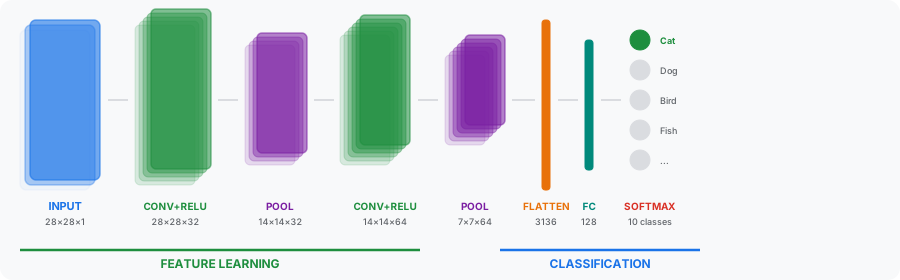
The data flows through: Input → Conv + ReLU → Pooling → Conv + ReLU → Pooling → Flatten → FC → Softmax
Each stage transforms the data. Let's look at each one.
Key Formulas
Before diving into the layers, here are the formulas you'll need:
Convolution Output Size
O = (W − K + 2P) / S + 1
Where W = input size, K = kernel size, P = padding, S = stride.
Example: Input 28, Kernel 3, Padding 1, Stride 1 → O = (28−3+2)/1+1 = 28
Padding for "Same" Output
P = (K − 1) / 2
This tells you how much padding to add so the output size equals the input size. Kernel 3 → P=1, Kernel 5 → P=2, Kernel 7 → P=3.
Pooling Output Size
O = (W − F) / S + 1
Where F = pool size, S = stride (usually F = S).
Example: Input 14, Pool 2, Stride 2 → O = (14−2)/2+1 = 7
Number of Parameters (Conv Layer)
Params = (K × K × C_in + 1) × C_out
Example: Kernel 3, 32 input channels, 64 output channels → (3×3×32+1)×64 = 18,496 parameters
Step 1: Input Layer
Every image is a grid of pixel values ranging from 0 to 255. A grayscale image is a 2D matrix (H × W × 1), while an RGB image has 3 channels (H × W × 3).
Common input sizes:
- MNIST: 28 × 28 × 1 (grayscale handwritten digits)
- CIFAR-10: 32 × 32 × 3 (tiny color images)
- ImageNet: 224 × 224 × 3 (high-res photos)
The pixel values are typically normalized to the range [0, 1] or [-1, 1] before feeding into the network.
Step 2: Convolution Layer
This is the core operation. A small filter (kernel) slides across the input image. At each position, it performs element-wise multiplication and sums the result to produce one value in the output feature map.
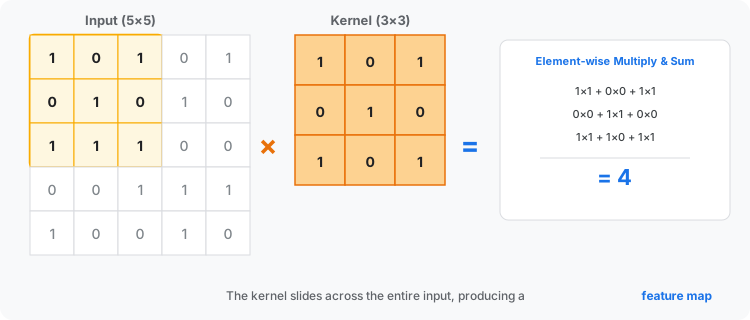
How it works:
- Place the 3×3 kernel on the top-left corner of the input
- Multiply each kernel value with the corresponding input value
- Sum all 9 products → this becomes one pixel in the output
- Slide the kernel one step right (stride) and repeat
- When you reach the end of a row, move down and start from the left
A 5×5 input with a 3×3 kernel (stride 1, no padding) produces a 3×3 output: (5−3)/1+1 = 3.
Key parameters
- Kernel size: Usually 3×3 or 5×5. Smaller kernels capture fine details
- Stride: How many pixels the kernel moves. Stride 1 = maximum overlap, Stride 2 = halves the output size
- Padding: Zeros added around the border. "Same" padding preserves spatial dimensions
- Number of filters: Each filter learns a different feature. More filters = more feature maps
Stride and Padding
Stride controls how far the kernel jumps at each step. Stride 1 gives maximum overlap and the largest output. Stride 2 skips every other position, halving the output dimensions.
Padding adds zeros around the border of the input. Without padding ("valid"), the output shrinks. With "same" padding, the output keeps the same spatial size as the input.
The padding needed for "same" output: P = (K − 1) / 2
Step 3: ReLU Activation
After convolution, we apply the ReLU (Rectified Linear Unit) activation function:
f(x) = max(0, x)
It's dead simple: keep positive values, replace negatives with zero.
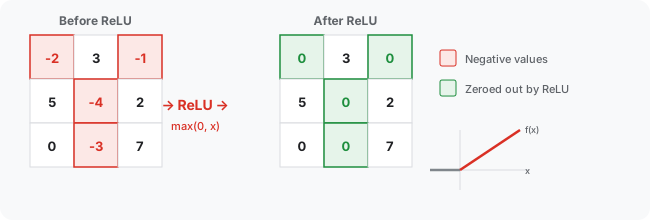
Why ReLU?
- Introduces non-linearity (without it, stacking layers would be pointless, it'd all collapse to a single linear transformation)
- Computationally cheap, just a comparison
- Solves the vanishing gradient problem that plagued sigmoid/tanh
- Creates sparse activations, many zeros means efficient representations
Step 4: Pooling Layer
Pooling downsamples the feature maps, reducing their spatial dimensions while keeping the strongest signals.
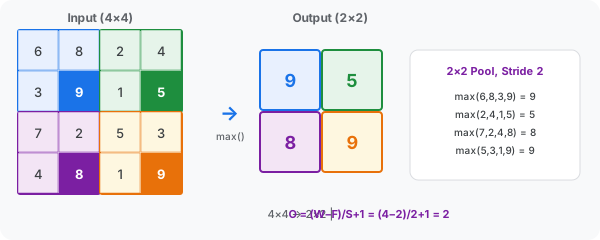
Max Pooling (most common): Takes the maximum value from each window. A 2×2 max pool with stride 2 reduces each dimension by half.
Why pool?
- Reduces computation (fewer pixels to process in later layers)
- Controls overfitting (fewer parameters)
- Provides translation invariance (small shifts in the input don't change the output much)
A 14×14 feature map after 2×2 max pooling becomes 7×7, a 75% reduction in spatial size.
Step 5: Stacking Layers
Real CNNs repeat the Conv → ReLU → Pool block multiple times. Each layer learns increasingly abstract features:
- Layers 1 to 2 (Low-Level): Edges, corners, gradients, simple textures
- Layers 3 to 4 (Mid-Level): Shapes, patterns, parts of objects (eyes, wheels)
- Layers 5+ (High-Level): Full objects, faces, scenes, semantic concepts
This hierarchy is what makes CNNs so powerful. The network automatically builds up from simple to complex, with each layer building on the previous one.
Step 6: Flattening
After the final pooling layer, the 2D feature maps need to be converted into a 1D vector. This is just reshaping, no learning happens here.
A 7×7×64 feature map becomes a vector of length 3,136 (7 × 7 × 64).
In PyTorch: x = torch.flatten(x, 1)
Step 7: Fully Connected Layer
The flattened vector feeds into one or more fully connected (dense) layers. Every neuron connects to every neuron in the next layer.
y = ReLU(W · x + b)
This is where the network combines all the learned features to make decisions. The FC layers learn which combinations of features correspond to which classes.
Typically there are 1 to 3 FC layers, with the last one having as many outputs as there are classes.
Step 8: Softmax Output
The final layer converts raw scores (logits) into probabilities using the softmax function:
σ(z)ᵢ = eᶻⁱ / Σ eᶻʲ
Each output represents the probability of one class. All probabilities sum to 1.0. The class with the highest probability is the prediction.
Loss function: Cross-Entropy Loss measures how far the prediction is from the true label. This is what drives learning through backpropagation.
How CNNs Learn
Training follows a simple loop:
- Forward pass: Input flows through all layers → prediction
- Compute loss: Compare prediction with the true label using Cross-Entropy
- Backward pass: Calculate gradients of the loss with respect to all weights (chain rule)
- Update weights: Optimizer (Adam or SGD) adjusts parameters to reduce loss
- Repeat over batches and epochs until convergence
PyTorch Implementation
Here's a complete, working CNN for MNIST digit classification:
import torch
import torch.nn as nn
import torch.optim as optim
import torchvision
import torchvision.transforms as transforms

class SimpleCNN(nn.Module):
 def __init__(self):
 super(SimpleCNN, self).__init__()
 self.conv1 = nn.Conv2d(1, 32, kernel_size=3, padding=1)
 self.conv2 = nn.Conv2d(32, 64, kernel_size=3, padding=1)
 self.pool = nn.MaxPool2d(2, 2)
 self.relu = nn.ReLU()
 self.fc1 = nn.Linear(64 * 7 * 7, 128)
 self.fc2 = nn.Linear(128, 10)

 def forward(self, x):
 x = self.pool(self.relu(self.conv1(x))) # 28→14
 x = self.pool(self.relu(self.conv2(x))) # 14→7
 x = torch.flatten(x, 1) # 7×7×64 → 3136
 x = self.relu(self.fc1(x)) # 3136 → 128
 x = self.fc2(x) # 128 → 10
 return x
Data loading
transform = transforms.Compose([
 transforms.ToTensor(),
 transforms.Normalize((0.5), (0.5))
])

train_set = torchvision.datasets.MNIST(
 root='./data', train=True, download=True, transform=transform
)
train_loader = torch.utils.data.DataLoader(
 train_set, batch_size=64, shuffle=True
)
Training loop
device = torch.device('cuda' if torch.cuda.is_available() else 'cpu')
model = SimpleCNN().to(device)
criterion = nn.CrossEntropyLoss()
optimizer = optim.Adam(model.parameters(), lr=0.001)

for epoch in range(5):
 running_loss = 0.0
 for images, labels in train_loader:
 images, labels = images.to(device), labels.to(device)
 optimizer.zero_grad()
 outputs = model(images)
 loss = criterion(outputs, labels)
 loss.backward()
 optimizer.step()
 running_loss += loss.item()
 print(f"Epoch {epoch+1}/5 Loss: {running_loss/len(train_loader):.4f}")
This gets ~98.5% accuracy on MNIST in just 5 epochs (~2 min on GPU).
Dimension Tracking
Here's how the data transforms through our CNN:
| Layer | Output Shape | Parameters |
|---|---|---|
| Input | 28 × 28 × 1 | 0 |
| Conv1 (3×3, 32 filters) | 28 × 28 × 32 | 320 |
| MaxPool (2×2) | 14 × 14 × 32 | 0 |
| Conv2 (3×3, 64 filters) | 14 × 14 × 64 | 18,496 |
| MaxPool (2×2) | 7 × 7 × 64 | 0 |
| Flatten | 3,136 | 0 |
| FC1 (128 units) | 128 | 401,536 |
| FC2 (10 units) | 10 | 1,290 |
| Total | 421,642 |
Where Are CNNs Used?
- Image Classification: Categorize images (cats vs dogs, medical scans)
- Object Detection: Locate and identify objects (self-driving cars, security)
- Face Recognition: Identify or verify people (phone unlock)
- Medical Imaging: Detect diseases from X-rays, MRIs, CT scans
- Video Analysis: Action recognition, tracking, surveillance
- NLP & Audio: Text classification, speech recognition via spectrograms
Key Takeaways
- CNNs automatically learn features from raw pixels, no manual feature engineering
- Conv → ReLU → Pool is the fundamental building block
- Deeper layers learn more abstract, high-level representations
- Pooling reduces dimensions while preserving the strongest signals
- FC layers combine features for final classification
- Softmax converts scores to probabilities, Cross-Entropy drives learning
CNNs transformed computer vision from hand-crafted features to end-to-end learning. Understanding each layer helps you debug, design, and improve your own networks.